.Net語言Smobiler開發(fā)中如何利用Gridview控件設(shè)計(jì)表單-創(chuàng)新互聯(lián)
這篇文章主要介紹.Net語言Smobiler開發(fā)中如何利用Gridview控件設(shè)計(jì)表單,文中介紹的非常詳細(xì),具有一定的參考價(jià)值,感興趣的小伙伴們一定要看完!

最前面的話:Smobiler是一個(gè)在VS環(huán)境中使用.Net語言來開發(fā)APP的開發(fā)平臺(tái),也許比Xamarin更方便。
一、目標(biāo)樣式
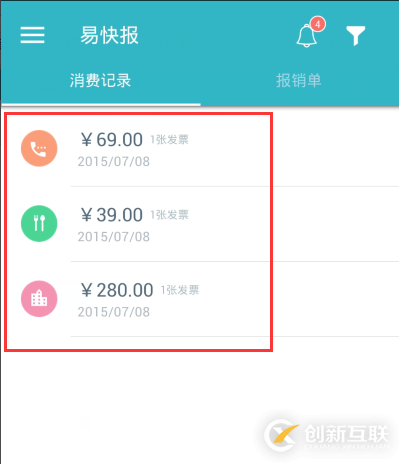
我們要實(shí)現(xiàn)上圖中的效果,需要如下的操作:
1.從工具欄上的”Smobiler Components”拖動(dòng)一個(gè)GridView控件到窗體界面上

2.修改GridView控件的屬性
a.load事件代碼
VB:
  Private Sub TestGridView3_Load(senderAs Object, e As EventArgs)Handles MyBase.Load
    Dim matTable As New DataTable
    With matTable
    .Columns.Add("MAT_IMG", GetType(String))
    .Columns.Add("MAT_DESC1", GetType(String))
    .Columns.Add("MAT_DESC2", GetType(String))
    .Columns.Add("MAT_DESC3", GetType(String))
    .Rows.Add()
    .Rows(0)("MAT_IMG") = "img97"
    .Rows(0)("MAT_DESC1") = "¥69.00"
    .Rows(0)("MAT_DESC2") = "2015/07/08"
    .Rows(0)("MAT_DESC3") = "1張發(fā)票"
    .Rows.Add()
    .Rows(1)("MAT_IMG") = "img96"
    .Rows(1)("MAT_DESC1") = "¥39.00"
    .Rows(1)("MAT_DESC2") = "2015/07/08"
    .Rows(1)("MAT_DESC3") = "1張發(fā)票"
    .Rows.Add()
    .Rows(2)("MAT_IMG") = "img95"
    .Rows(2)("MAT_DESC1") = "¥280.00"
    .Rows(2)("MAT_DESC2") = "2015/07/08"
    .Rows(2)("MAT_DESC3") = "1張發(fā)票"
    End With
    Me.GridView1.DataSource = matTable
    Me.GridView1.DataBind()
  End Sub C#:
  private void TestGridView3_Load(object sender, EventArgs e)
  {
    DataTable matTable = new DataTable();
    matTable.Columns.Add("MAT_IMG", typeof(string));
    matTable.Columns.Add("MAT_DESC1", typeof(string));
    matTable.Columns.Add("MAT_DESC2", typeof(string));
    matTable.Columns.Add("MAT_DESC3", typeof(string));
    matTable.Rows.Add();
    matTable.Rows[0]["MAT_IMG"] = "img97";
    matTable.Rows[0]["MAT_DESC1"] = "¥69.00";
    matTable.Rows[0]["MAT_DESC2"] = "2015/07/08";
    matTable.Rows[0]["MAT_DESC3"] = "1張發(fā)票";
    matTable.Rows.Add();
    matTable.Rows[1]["MAT_IMG"] = "img96";
    matTable.Rows[1]["MAT_DESC1"] = "¥39.00";
    matTable.Rows[1]["MAT_DESC2"] = "2015/07/08";
    matTable.Rows[1]["MAT_DESC3"] = "1張發(fā)票";
    matTable.Rows.Add();
    matTable.Rows[2]["MAT_IMG"] = "img95";
    matTable.Rows[2]["MAT_DESC1"] = "¥280.00";
    matTable.Rows[2]["MAT_DESC2"] = "2015/07/08";
    matTable.Rows[2]["MAT_DESC3"] = "1張發(fā)票";
    this.GridView1.DataSource = matTable;
    this.GridView1.DataBind();
  }
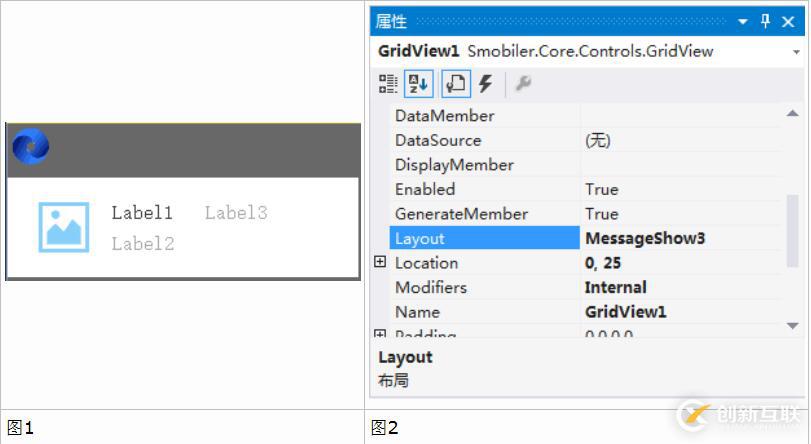
b.Layout屬性
新創(chuàng)建MobileForm項(xiàng),并命名為MessageShow3,并拖入一個(gè)Label控件,如圖1
GridView的Layout屬性,綁定新建的窗體MessageShow3,如圖2
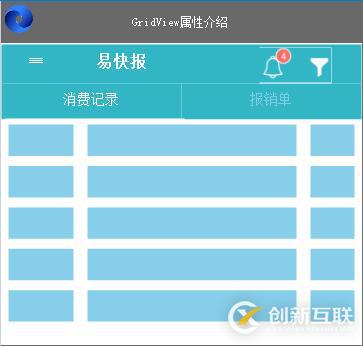
3.Smobiler窗體設(shè)計(jì)界面顯示效果
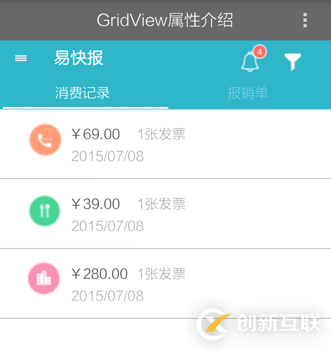
二、手機(jī)效果顯示
以上是“.Net語言Smobiler開發(fā)中如何利用Gridview控件設(shè)計(jì)表單”這篇文章的所有內(nèi)容,感謝各位的閱讀!希望分享的內(nèi)容對(duì)大家有幫助,更多相關(guān)知識(shí),歡迎關(guān)注創(chuàng)新互聯(lián)行業(yè)資訊頻道!
名稱欄目:.Net語言Smobiler開發(fā)中如何利用Gridview控件設(shè)計(jì)表單-創(chuàng)新互聯(lián)
轉(zhuǎn)載來源:http://www.chinadenli.net/article14/docege.html
成都網(wǎng)站建設(shè)公司_創(chuàng)新互聯(lián),為您提供網(wǎng)站改版、用戶體驗(yàn)、電子商務(wù)、網(wǎng)站內(nèi)鏈、品牌網(wǎng)站建設(shè)、標(biāo)簽優(yōu)化
聲明:本網(wǎng)站發(fā)布的內(nèi)容(圖片、視頻和文字)以用戶投稿、用戶轉(zhuǎn)載內(nèi)容為主,如果涉及侵權(quán)請(qǐng)盡快告知,我們將會(huì)在第一時(shí)間刪除。文章觀點(diǎn)不代表本網(wǎng)站立場(chǎng),如需處理請(qǐng)聯(lián)系客服。電話:028-86922220;郵箱:631063699@qq.com。內(nèi)容未經(jīng)允許不得轉(zhuǎn)載,或轉(zhuǎn)載時(shí)需注明來源: 創(chuàng)新互聯(lián)
猜你還喜歡下面的內(nèi)容
- phpcurl的基本操作方法-創(chuàng)新互聯(lián)
- 問題解決系列:從源碼講解為什么是‘JZ0SL-創(chuàng)新互聯(lián)
- C語言快速排序與二分查找算法示例-創(chuàng)新互聯(lián)
- php獲取周邊酒店信息的方法-創(chuàng)新互聯(lián)
- vue實(shí)現(xiàn)點(diǎn)擊選中,其他的不選中方法-創(chuàng)新互聯(lián)
- 怎么在Python中使用Pyinstaller實(shí)現(xiàn)打包-創(chuàng)新互聯(lián)
- html5如何實(shí)現(xiàn)兼容各大瀏覽器的播放器-創(chuàng)新互聯(lián)

- ChatGPT的應(yīng)用ChatGPT對(duì)社會(huì)的利弊影響 2023-02-20
- 怎樣利用chatGPT快速賺錢? 2023-05-05
- 火爆的ChatGPT,來聊聊它的熱門話題 2023-02-20
- ChatGPT是什么?ChatGPT是聊天機(jī)器人嗎? 2023-05-05
- 爆紅的ChatGPT,誰會(huì)丟掉飯碗? 2023-02-20
- ChatGPT的發(fā)展歷程 2023-02-20
- 馬云回國,首談ChatGPT。又是新一個(gè)風(fēng)口? 2023-05-28
- ChatGPT是什么 2023-02-20